Overview
FEX Triage™
FEX Triage is a portable forensic tool for real-time field analysis, helping investigators make informed decisions during seizures and forensic acquisition. It supports both novice and expert users and can run on live machines or forensic boot media.
- Portable field analysis tool
- Modes: Basic (novice) & Advanced (expert)
- Runs live or via forensic USB
- Customizable single-click search profiles
- Reports: child abuse material, registry, browser/chat history, thumbnails, emails
- Exports: L01 or disk
Key Features
Ease of Use
FEX Triage is easy to use and can be effective with minimal training. Advanced mode options also make it a valuable tool for experienced forensic practitioners.
Integrates with Forensic Explorer
A FEX Triage scan creates a Forensic Explorer case file. It preserves user actions in a forensic sound manner and enables forensic staff to immediately further examine triage results in directly in the Forensic Explorer GUI.
Portable
FEX Triage is portable and is designed specifically to run from a USB. It typically can be run in the following scenarios:
A Forensic Boot-Scan
Boot scan refers to starting a target computer using investigators boot media (i.e. the FEX Triage dongle). A boot-scan is a forensically sound process as it is the investigator media that is controlling the target system.
A Live Scan
Live scan refers to running FEX-Triage on a target live Microsoft Windows computer. In many cases this will be the most appropriate action due to concerns about powering down a running system which is crucial to a business, or may invoke encryption.
Can be effectively used to target file collection over a network file share (e.g. collect .docx files by name or content and export to L01 forensic image format).
A Forensic Desktop Scan
Can be run from the desktop of an investigators computer to scan hard drives or forensic image files.
Other Key Features
- FEX Triage is provided with a rugged Wibu Codemeter USB3 CmStick_BMC-1011 with 16 GB storage. It contains the software license but also acts as a USB boot and data collection device.
- Supports collection of data from Windows and MacOS (via USB boot) including iOS backups.
- Detects BitLocker and FileVault2 protected drives.
- View search results whilst the search is in progress.
- Export data directly to disk or to a forensic .L01 file.
- Creates CSV, PDF and RTF reports. View pictures and video key frames.
- Search profiles are highly configurable and can be customized for an organization. Default profiles include:
Basic
- Cameras by Make Model
- Child Protection – Pictures and Video
- Encrypted Files
- Filename Search
- Filename Search – Individual
- Internet – Browsers
- Internet – Chat
- Internet – Mobile
- ITunes Backup
- Random Sample – Graphics
- Random Sample – Video
- Registry – Current
Intermediate
- Windows – Thumbnails
- Email – Attachments (EDB, Mbox, OST, PST)
- Email – Find Messages
- Email – Keyword Search (EDB, Mbox, OST, PST)
- Export – Extensions (Checkbox)
- Export – Windows System (Checkbox)
- Filename Search (Exact)
- Hash Match (Auto) – Graphics and Video
- Keyword Search – MS Office
- Operating System Artifacts
- Random Sample – Graphics
- Windows – Shortcuts (.lnk)
Advanced
- Email – Find Messages (Regex)
- Export – Custom Global Search
- Filename Search (Regex)
- Hash Match (Checkbox) – Graphics and Video
- Hash Match (Hard-Coded) – Graphics and Video
- List Files to CSV – Custom Global Search
Technical Features
Supported File Systems
Forensic Explorer supports analysis of:
- Windows FAT12/16/32, exFAT, NTFS,
- Macintosh HFS, HFS+, APFS
- EXT 2/3/4
Encryption Support
Unlocks the following (password or recovery key required):
- Bitlocker (Microsoft Windows)
- FileVault 2 (MAC)
Supported Bit-Image Formats
FEX-Triage supports common image and forensic image formats including:
- AD1, AFF, DD, DMG, BIN, RAW, E01, Ex01, L01, Lx01, VMD, VHD, VHDX.
Supported Email Formats
Supports analysis of PST, OST, EDB and MBOX mail formats.
Scripting Language
FEX Triage scripts are written in Delphi Pascal.
Wibu CodeMeter USB
Wibu CodeMeter 16 GB USB3 Data Sheet
Search Profiles
Search profiles are created in .TXML (XML) format. Profiles use TCommandTasks to initiate processing, which includes the ability to call and run scripts and filters. Common TCommandTasks are:
| TCommandTask_CacheThumbNails | Cache graphics in case. |
| TCommandTask_CacheVideoThumbNails | Cache video in case. |
| TCommandTask_CreateHash | Hash files. |
| TCommandTask_DataStore | Sets the data store (e.g. Email). |
| TCommandTask_ExpandCompoundFiles | Expands compound files. |
| TCommandTask_ExportEntryList | Exports a list of files as CSV. |
| TCommandTask_ExportFiles | Exports files to disk. |
| TCommandTask_ExportFilesL01 | Exports files to L01. |
| TCommandTask_FileTypeAnalysis | Signature analysis. |
| TCommandTask_Filter | Runs a filter script. |
| TCommandTask_MatchHash | Performs a hash match. |
| TCommandTask_Parallel | Runs command tasks in parallel. |
| TCommandTask_ReportGenerator | Creates a report in PDF, RTF, HTML. |
| TCommandTask_Script | Runs a script. |
| TCommandTask_SearchforKnownFS | Locates a file system (e.g. NTFS). |
| TCommandTask_SearchforKnownMBR | Locates a Master Boot Record. |
| TCommandTask_SearchforLostFiles | Carve for files. |
Screen Shots
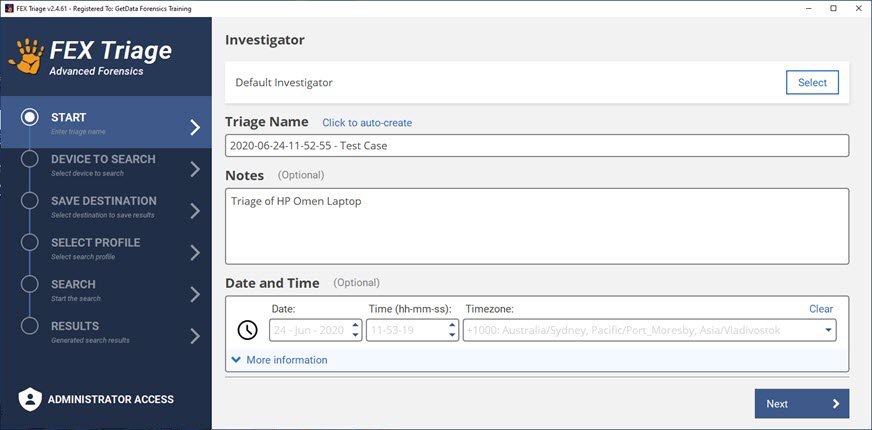
Start window where case information is added:
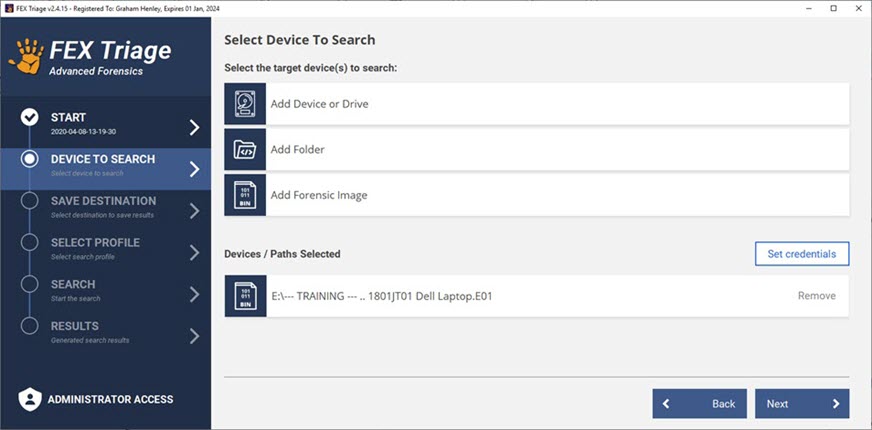
Select the device, folder or forensic image to be searched:
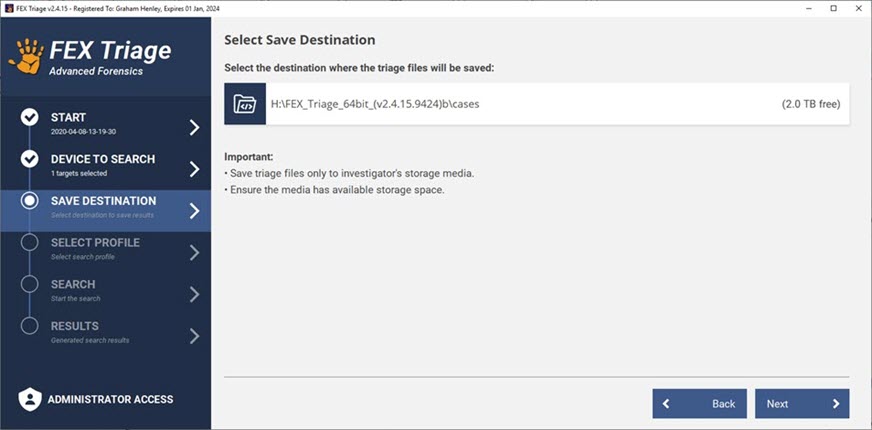
Select the destination where search results will be saved:
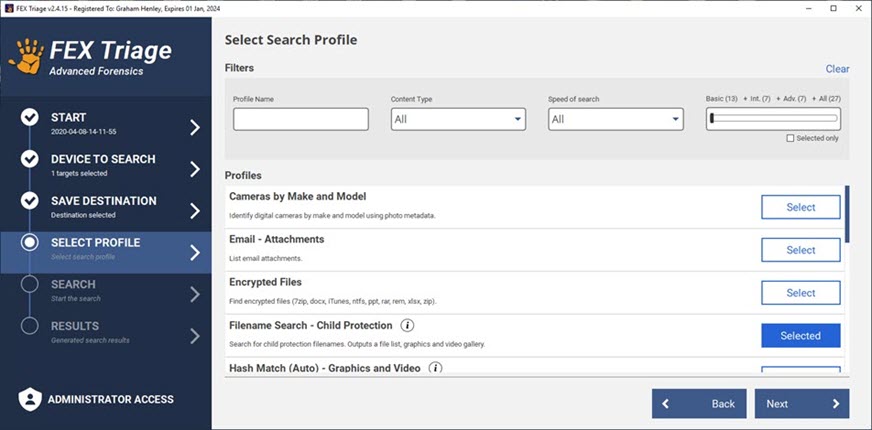
Select the search profile using available filter options if required:
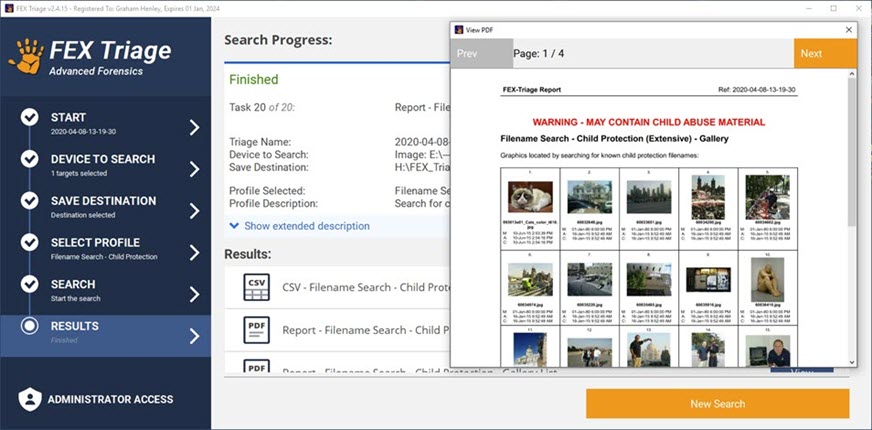
Start the search. Completed reports can be viewed as they complete:
Purchase & Licensing FAQs
License Type
A FEX Triage license is a fixed term license and will expire at the term date (typically 1 year).
Wibu CodeMeter Activation Dongle (Wibu Dongle)
The software is activated by a license on a Wibu Dongle. A FEX Triage dongle has a storage capacity (16 or 32 GB) and can be used as a boot USB.
License Management
Wibu Dongle licenses are managed using the GetData License Manager software (download here). The License Manager is used to:
- View license information.
- Add a license to a Wibu Dongle.
- Rename a dongle.
- Apply firmware updates.
Learn more about license management here.
License Delivery
Wibu Dongles are shipped worldwide by FEDEX. Web tracking information is provided for each shipment. Courier delivery costs are included in the checkout process.
Download
FEX Triage 64 bit – Portable
Setup Instructions:
- Download and expand the ZIP file.
- Launch FEX Triage using the FEX_Triage_Launch.exe.
FEX Triage USB Boot ISO
GetData_WinPE_v6.iso (1172139280 bytes, 1.09gb)
- Download the ISO.
- Use Rufus (or similar) to write the ISO to a USB (USB 3.2 recommended).
- Move the unzipped FEX-Triage folder to the USB (either the root or the Programs folder).
- Boot the target system with the USB. WinFE Write Protect Tool will run.
- Locate your boot USB in the WinFE GUI.
- Set your boot USB to Read/Write. Mount your boot USB.
- If you wish to search other logical drives on the target system, mount these drives (but leave them in Read Only mode).
- Continue to exit WinFEX. Navigate to your boot USB and launch FEX_Triage_Launch.exe as administrator.
To customize your own boot USB, refer to this PEBackery build guide: GetData_FEX_Triage_WinPE_ISO_Guide.pdf
Purchase
Maintenance Renewal
Change log
15 Sep 2025 – FEX-Triage-64bit-(V3.10.13.6556C)
- DLL Updates.
8 Sep 2025 – FEX-Triage-64bit-(V3.10.13.6556B)
- Script Updates.
30 Apr 2025 – FEX-Triage-64bit-(V3.10.13.6064A)
- Updated CLI engine.
- Script maintenance – Removed device and file encryption check from all profiles (for speed purposed). Encrypted drives and files can be identified by running a specific profile.
30 Apr 2025 – FEX-Triage-64bit-(V3.10.13.6064A)
- Improved identification of physical and logical drives.
20 Apr 2025 – FEX-Triage-64bit-(V3.10.13.6064A)
- Fixed issue with profile for Windows System files export.
- Added Timezone offset description.
- Updated slide-bar color to green to better show active status.
14 Apr 2025 – FEX-Triage-64bit-(V3.10.11.6064A)
- Improved speed of CSV Viewer in triage results window.
10 Apr 2025 – FEX-Triage-64bit-(V3.10.9.6064A)
- Improved identification of BitLocker drives.
11 Mar 2025 – FEX-Triage-64bit-(V3.10.6.6064A)
- Credentials – Fixed issue reading BitLocker passwords from input file.
- CSV Viewer update.
- Script maintenance.
14 Feb 2025 – FEX-Triage-64bit-(V3.10.4.5970A)
- Improved license check.
7 Feb 2025 – FEX-Triage-64bit-(V3.10.2.5970A)
- Release of v3 GUI.
- Other general code updates.
9 Dec 2024 – FEX-Triage-64bit-(v3.0.0.5470C) – Download this build (last v2 GUI).
- Fixed error with Yara match filter.
29 Aug 2024 – FEX-Triage-64bit-(v3.0.0.5470B)
- Updated FEX Memory acquisition.
25 Aug 2024 – FEX-Triage-64bit-(v3.0.0.5470A)
- Updates for new Phoenix USB boot.
- Script updates.
8 Aug 2024 – FEX-Triage-64bit-(v3.0.0.5442A)
- APFS updates.
- Updated Regex component.
2 Aug 2024 – FEX-Triage-64bit-(v3.0.0.5432A)
- Script maintenance.
21 Jun 2024 – FEX-Triage-64bit-(v3.0.0.5182A)
- Script maintenance.
10 May 2024 – FEX-Triage-64bit-(v3.0.0.5140C)
- Script maintenance.
10 May 2024 – FEX-Triage-64bit-(v3.0.0.5140B)
- Updates to Graphics Analysis.
03 May 2024 – FEX-Triage-64bit-(v3.0.0.5090C)
- Script Updates.
26 Apr 2024 – FEX-Triage-64bit-(v3.0.0.5090A)
- New v3 GUI.
- AI Graphics – Added profiles for: All, Drugs, Credit Card, CSAM, ID, Weapon.
- Yara – Added profile for Yara rules.
12 Jan 2024 – FEX-Triage-64bit-(v2.6.0.4692A)
- Updated Project Vic .JSON hash set match.
13 Nov 2023 – FEX-Triage-64bit-(v2.6.0.4070E)
- Updated training hash sets.
11 Jul 2023 – FEX-Triage-64bit-(v2.6.0.4070D)
- Internet Browser – Added summary results.
- Script updates.
9 Apr 2023 – FEX-Triage-64bit-(v2.6.0.3676G)
- Script updates.
26 Mar 2023 – FEX-Triage-64bit-(v2.6.0.3676E)
- Basic > Advanced slide-bar now defaults to ‘All’.
23 Mar 2023 – FEX-Triage-64bit-(v2.6.0.3676D)
- Added ZIP/RAR internal filenames to filename search.
- General script updates.
11 Mar 2023 – FEX-Triage-64bit-(v2.6.0.3676C)
- Added dll for Launch_Menu.exe
- Update FEX-Imager.
- User guide update.
8 Mar 2023 – FEX-Triage-64bit-(v2.6.0.3676A)
- Script and TXML updates.
17 Feb 2023 – FEX-Triage-64bit-(v2.6.0.3584A)
- Script and TXML updates.
3 Feb 2023 – FEX-Triage-64bit-(v2.6.0.3516A)
- Add FEX_Menu. launcher for Triage, Imager, Memory programs.
27 Jan 2023 – FEX-Triage-64bit-(v2.6.0.3516A)
- General script and filter updates.
- Updated Codemeter.exe activation.
9 Jan 2023 – FEX-Triage-64bit-(v2.6.0.3468A)
- JSON – Fixed issue populating Hash Match Category number.
13 Nov 2022 – FEX-Triage-64bit-(v2.6.0.3258A)
- Update hashing engine for NSRL v3 support.
6 Aug 2022 – FEX-Triage-64bit-(v2.6.0.2898B)
- ‘All’ is now the default group for profiles when FEX-Triage is first run.
26 Jul 2022 – FEX-Triage-64bit-(v2.6.0.2898A)
- Updated artifact chat template.
- Other minor engine updates.
12 May 2022 – FEX-Triage-64bit-(v2.6.0.2660C)
- FEX Memory update with the FEX Triage zip file.
6 May 2022 – FEX-Triage-64bit-(v2.6.0.2660B)
- Added ‘Content Type’ to Filename Search for profile lookup.
3 Feb 2022 – FEX-Triage-64bit-(v2.4.65.2488A)
- Added Memory Acquisition (RAM capture) profile.
- Updates for Bitlocker and APFS.
- Update to identification of encrypted files.
- General updates in line with FEX GUI (see the FEX GUI change log).
See other Get Data Products
GetData Forensics provide cutting edge software and solutions to reduce forensic backlogs, streamline digital investigations and maximize results.

FEX CLI™
The Forensic Explorer Command Line (FEX CLI) is a high-performance forensic data processing engine designed for digital forensics...
Learn More
FEX Cloud Capture
About FEX Cloud Capture™ (free) FEX Cloud Capture™ is a software tool for the acquisition of data stored on...
Learn More
FEX Imager™ (free)
This forensic imaging tool captures bit-level images with full hash verification (MD5, SHA1, SHA256) from physical drives, logical...
Learn More