Overview
FEX Imager™ (free)
This forensic imaging tool captures bit-level images with full hash verification (MD5, SHA1, SHA256) from physical drives, logical drives, folders, files, or remote devices. It ensures secure, accurate acquisition and supports multiple image formats and compression options.
- Acquire: physical, logical, folders/files, remote devices
- Full hash verification: MD5, SHA1, SHA256
- Image formats: DD/RAW, E01, L01
- Compression: none, fast, good, best
Key Features
Acquire
- Acquire physical, logical, folders and files.
- Re-acquire existing forensic image files.
- Supports acquisition from remote devices using the GetData Forensics servlet.
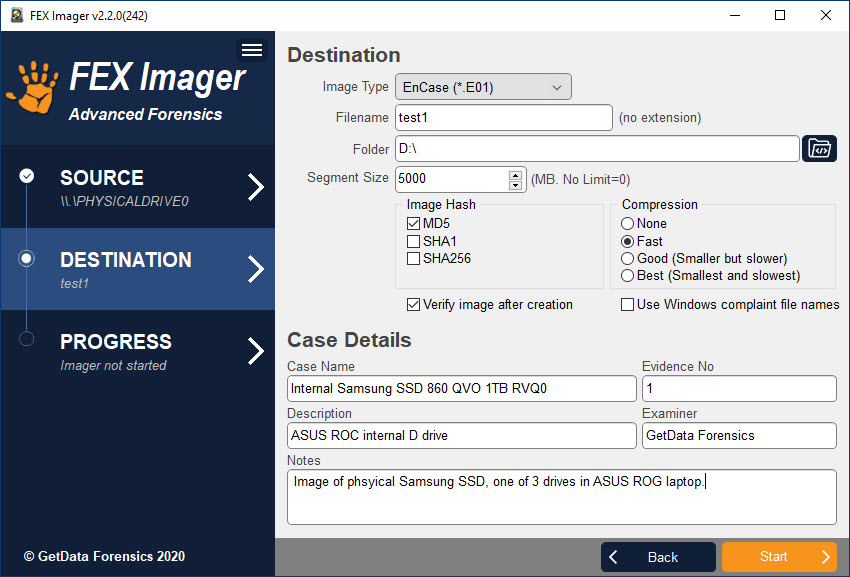
- Acquire to .E01 or DD format with MD5, SHA1 or SHA256 acquisition hash.
- Acquire folders and files to L01 format with full MD5, SHA1 or SHA256 file hash.
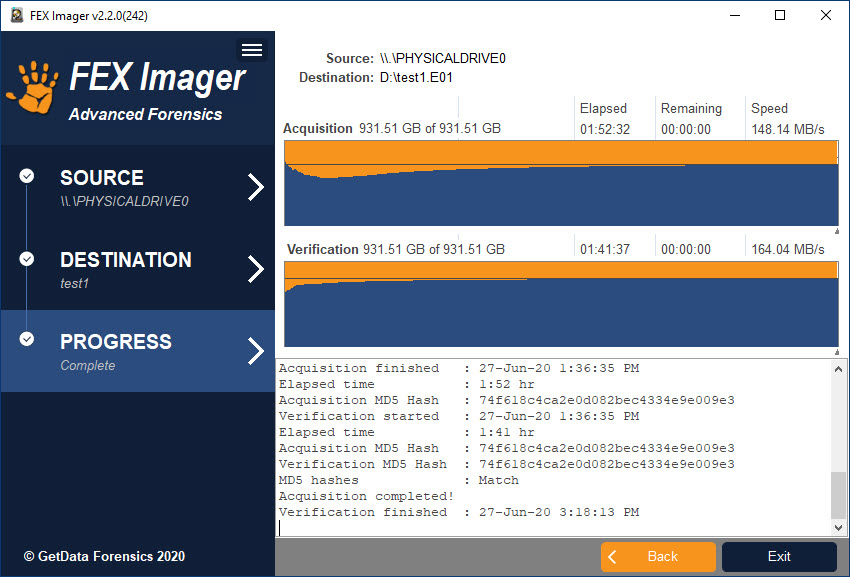
- Automatically verify acquisition hash after creation.
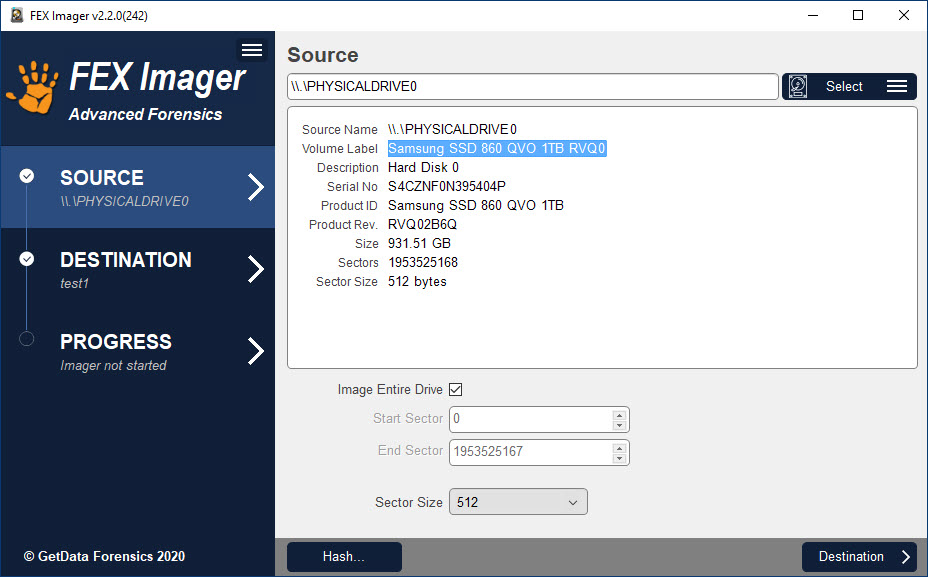
- Image an entire device or set start and end sector positions.
- Split image files into custom segments with no segment size limit.
- Option to set device sector size to acquire at 512, 2048, or 4096 sector size.
- Option to force Windows compliant file names for use with Magnet Forensics products.
Compression
Supports EnCase None, Fast, Good, Best compression settings for E01 and L01 formats.
Case Data
Writes acquisition information within EnCase E01 and L01 formats.
Log
Records a detailed log file including device details and source and verification hash information.
System Requirements
FEX Imager is a 64 bit application.
Minimum recommended system requirements are:
- i7
- 16 GB RAM
- Windows 10
Run as local Administrator to ensure that sufficient access rights are available for access to devices. FEX Imager does not support the acquisition of HPA or DCO areas (The HPA and DOC are two areas of a hard drive that are not normally visible to an operating system or an end user. Whilst the HPA and DCO are hidden, it is technically possible for a user to access these areas and store/hide data).
Screen Shots
Select source device:
Select destination and enter case details:
Acquire and verify:
Purchase & Licensing FAQs
LICENSE AGREEMENT
GetData® Forensics Pty Ltd (“GetData”) ACN: 143458039
IMPORTANT END USER LICENSE AGREEMENT
PLEASE READ THIS SOFTWARE LICENSE AGREEMENT (“AGREEMENT”) CAREFULLY BEFORE USING FORENSIC EXPLORER (“the SOFTWARE”). BY USING THE SOFTWARE, YOU ARE AGREEING TO BE BOUND TO THE TERMS AND CONDITIONS OF THIS LICENSE SET OUT BELOW. IF YOU DO NOT AGREE TO BE BOUND BY THE TERMS AND CONDITIONS SET OUT BELOW, DO NOT INSTALL AND/OR USE THE SOFTWARE. PLEASE TERMINATE INSTALLATION IMMEDIATELY AND DO NOT USE THE SOFTWARE.
Software Covered by This License
- This license agreement applies only to the version of the Forensic Explorer software package with which this agreement is included. Different license terms may apply to other software packages from GetData and license terms for later versions of Forensic Explorer may also be changed.
General
- GetData is and remains the exclusive owner of the Software. You acknowledge that copyright in the Software remains at all times with GetData.
- The Software and any other materials included under this license, are licensed, not sold to you by GetData for use only under the terms of this Agreement.
- GetData or its licensors own the Software, including all materials included with this package. GetData owns the names and marks of ‘GetData,’ and ‘Forensic Explorer’ under copyright, trademark and intellectual property laws and all other applicable laws.
Permitted License Uses and Restrictions
- Subject to the terms and conditions of this License, a single License of the Software permits you to run a single Licensed instance of the Software. Where multiple Licenses have been purchased, the License permits you to run concurrent instances of the Software equal to the number of Licenses purchased.
- You are solely responsible for the protection of your data, your systems and your hardware used in connection with the Software. GetData will not be liable for any loss or damage suffered from the use of the Software.
- You and others are not permitted to copy (except as expressly permitted by this Agreement), decompile, reverse engineer, disassemble, attempt to derive the source code of, decrypt, modify (except to the extent allowed in the documentation accompanying this Agreement) or remove or alter any proprietary legends contained in the Software.
- You are not permitted to share the product activation information provided to you for this Software with other users.
- You may not publicly display the Software or provide instruction or training for compensation in any form without the express written permission of GetData.
- GetData reserves the right to check any and all license details at any time in any reasonable manner.
- GetData may from time to time revise or update the Software and may make such revisions or updates available to you subject to payment of the applicable license fee.
- The Software is protected under United States law and International law and International conventions and treaties. You may not rent, lease, lend, sell, redistribute or sublicense the Software without the express written permission of GetData.
- If you purchase a site license, there will be terms and conditions listed in the appendix of the site license.
Download
FEX Imager (Free)
Setup Instructions:
- Download the setup executable and follow the on-screen installation instructions.
- FEX Imager is free software and does not require activation
Change Log
FEX Imager – v2.2.0.306 – 23 May 2025
- Updated servlet to support encrypted data transfer.
FEX Imager – v2.2.0.304 – 30 Jan 2025
- Setup will now install 32bit or 64bit as per the host OS.
FEX Imager – v2.2.0.199 – 15 Aug 2024
- General speed improvements.
FEX Imager – v2.2.0.194 – 20 Jul 2024
- Update to improve segmented L01 reading in relativity.
- General speed improvements.
FEX Imager – v2.2.0.287 – 10 Jul 2024
- Update to servlet for remote devices.
FEX Imager – v2.2.0.286 – 20 Jun 2023
- Increased buffer size to improve acquisition speed.
- Added the ability to select a secondary destination drive if the first runs out of space.
FEX Imager – v2.2.0.283 – 18 May 2023
- Updates Select > Remote form components.
FEX Imager – v2.2.0.281 – 29 Mar 2023
- Updated CTRL+X function for fields.
FEX Imager – v2.2.0.280 – 8 Mar 2023
- Fixed issue with .L01 progress bar.
- Updated field selection components.
FEX Imager – v2.2.0.270 – 7 July 2021
- Removed zero pad to image size.
FEX Imager – v2.2.0.263 – 7 January 2021
- Adjusted sector calculation to mirror FTK imager.
FEX Imager – v2.2.0.259 – 3 September 2020
- Remote connection handles changing I.P. address
FEX Imager – v2.2.0.255 – 14 July 2020
- Now built as a 64 bit application (32 bit only by request)
FEX Imager – v2.2.0.253 – 9 July 2020
- Updated help file
- Updated home page links
See other Get Data Products
GetData Forensics provide cutting edge software and solutions to reduce forensic backlogs, streamline digital investigations and maximize results.
FEX Memory Imager™ (free)
FEX Memory Imager captures the physical RAM of a running computer, enabling recovery of volatile artifacts critical to...
Learn More
FEX Imager™ (free)
This forensic imaging tool captures bit-level images with full hash verification (MD5, SHA1, SHA256) from physical drives, logical...
Learn More
FEX Cloud Capture
About FEX Cloud Capture™ (free) FEX Cloud Capture™ is a software tool for the acquisition of data stored on...
Learn More